Best Fyxer.ai Alternative in 2026: Inbox Zero Comparison
Comparing Fyxer.ai with Inbox Zero
An AI email assistant that drafts replies, sorts your inbox, and includes a built-in meeting notetaker, though it locks you into fixed categories and costs more than Inbox Zero.
Inbox Zero and Fyxer are both AI email assistants. They organize your inbox and draft replies in your voice. Here's a full walkthrough comparing the two, side by side:
So the real question isn't which one works, because both do. It's which one fits how you run your inbox, and what you get for the price. Fyxer starts at $30 per user per month, Inbox Zero at $20. The one feature that might pull you toward Fyxer is its built-in meeting notetaker. If you already use a notetaker, or don't need one, Inbox Zero does more across the board for less money.
Here's the feature by feature breakdown.
Pricing
Fyxer starts at $30 per user per month, or $22.50 if you pay annually. Its Professional plan is $50 per month ($37.50 annually) and adds things like multiple accounts and HubSpot. Inbox Zero starts at $20 per month.
| Plan | Monthly | Annual | Includes |
|---|---|---|---|
| Fyxer Starter | $30/mo | $22.50/mo | 1 email account, core features |
| Fyxer Professional | $50/mo | $37.50/mo | Multiple accounts, HubSpot, more analytics |
| Inbox Zero | $20/mo | Full feature set |
The gap matters more than it looks, because you pay per seat. Fyxer is 50% more expensive at the entry level, and that difference repeats for every person you add. For a five person team that's roughly $1,800 a year on Fyxer versus $1,200 on Inbox Zero before anyone touches an advanced feature.
Categorization
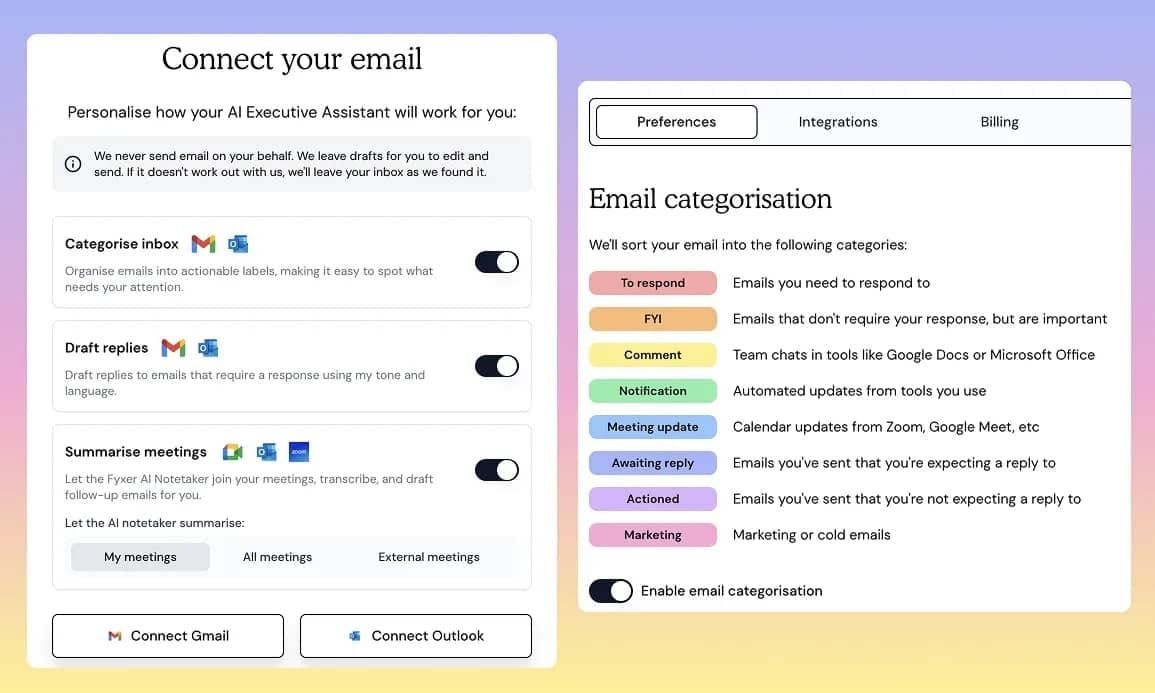
Both tools sort incoming email into labels. Fyxer uses a fixed set: To Respond, FYI, Notifications, Marketing, and so on. For a lot of people that's enough.
Inbox Zero does the same out of the box, but you can also set your own categories. Want a Travel label, or a label for a specific client? You create it. Fyxer doesn't give you that option.
The bigger difference is actions. In Inbox Zero you decide what happens to an email once it's categorized, not just where it lands. Want every receipt forwarded to your accountant automatically? You can set that up. Fyxer has no equivalent. It sorts your mail and that's where it stops.
Drafting replies
This is the headline feature for both products, and both do it well. They learn from your email history and write replies that sound like you, ready the moment a new email lands.
Where they split is customization. Fyxer lets you describe your overall writing style. Inbox Zero does that too, but it also gives you a full knowledge base. You can tell the assistant exactly how to handle different situations, feed it the context it needs, and connect other sources of information so the drafts get smarter over time.
Most people won't need to go that deep, and you don't have to. But if you want the assistant to know your pricing, your policies, or details from your CRM before it drafts a reply, Inbox Zero supports that and Fyxer doesn't.
Scheduling meetings
Both handle scheduling. If someone emails asking to meet at 5pm tomorrow, both check your real calendar availability and reply accordingly. Ask "when are you free this week?" and the assistant comes back with actual open slots.
Both also let you share a booking link. With Inbox Zero you can drop in your existing Calendly or cal.com link instead of building a new one. Scheduling is solid on either tool.
Follow-ups
Both products draft follow-ups when someone hasn't replied to you. You emailed a client five days ago and heard nothing, so the assistant drafts a nudge.
Inbox Zero takes this further in two ways. First, it also reminds you when you're the one who went quiet. An important email came in last week and you never replied, so it gets labeled as needing a follow-up. Fyxer only covers the case where the other person dropped off. Second, if you've connected Slack or Microsoft Teams, Inbox Zero can ping you there, so reminders don't just sit in the inbox you're already behind on.
Meeting notetaker
Here's the one place Fyxer has something Inbox Zero doesn't. Fyxer includes an AI meeting notetaker that joins your calls and writes up notes. Inbox Zero has no notetaker.
Be honest with yourself about whether you need it. There are plenty of standalone notetakers, and if you already use one this won't move the needle. But if you'd rather have it built into your email assistant and you're not paying for a separate tool, that's a real reason to look at Fyxer. It's the main reason we'd point someone their way over us.
Bulk unsubscribe and bulk archive
This is Inbox Zero only, and it's one of the fastest ways to clean out a messy inbox.
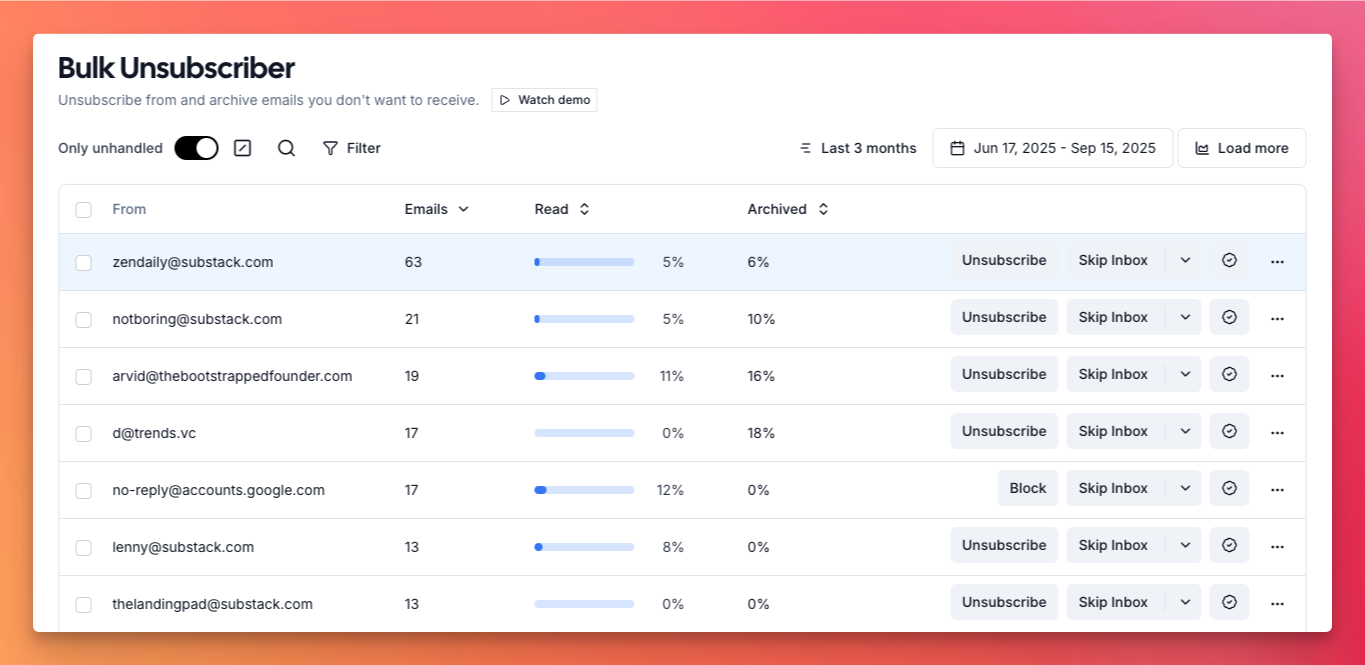
Bulk unsubscribe shows you every sender you're subscribed to, along with how often they email and how much of it you actually open. That report that sent 82 emails in three months and you opened 5% of the time? Select it, unsubscribe, done. Or clear a whole batch in one go.
Bulk archive does the same for clearing out mail. Archive every newsletter, or every marketing email, in one click. It can clear thousands of emails in a single pass. Fyxer has neither feature, so you're back to unsubscribing one sender at a time.
Analytics
Inbox Zero gives you a detailed view of your email: how many you're getting and sending, who emails you most, and how long you take to reply. The same analytics roll up to the organization level, so you can see which teammates are buried and where time is being lost across the team.
Fyxer has some analytics, but the more useful ones sit behind a higher tier (the $50 plan rather than the entry plan), and they don't go into the same depth.
Custom rules and actions
Where Fyxer stops at sorting, Inbox Zero lets you build rules that act on email automatically. A few examples of what people set up:
- When an email from an important client mentions "contract", mark it as priority and send a Slack notification
- Archive newsletters after a week unless you've starred them
- Forward invoices to your bookkeeper and label them as processed
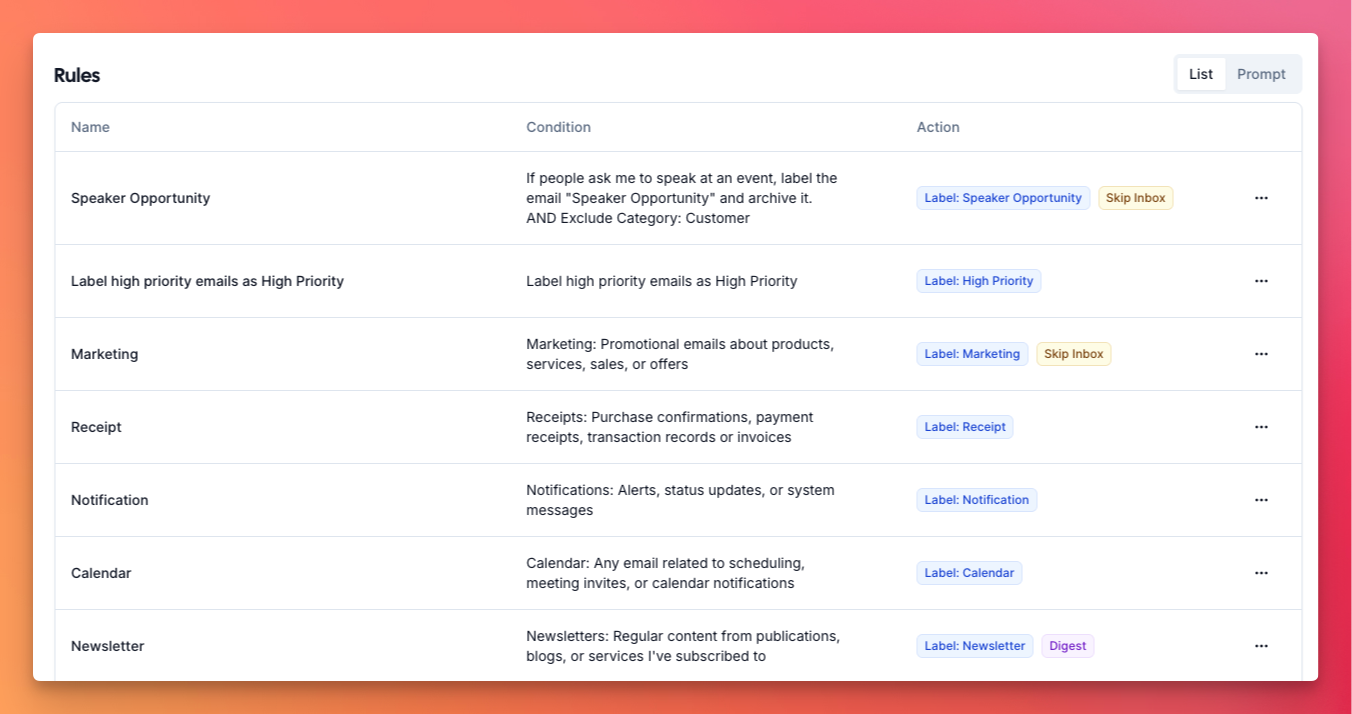
The built-in assistant can create these from plain English. Tell it "keep my inbox clean by archiving marketing emails older than a week" and it writes the rule for you.
Meeting briefs
Before an external call, Inbox Zero sends you a brief. It researches who's joining, pulls your email history with them, and surfaces the context that matters. This is most useful for people you've never spoken to, like a new prospect where you want as much background as possible before the call.
It only does this for external meetings, so your inbox doesn't fill up with briefs for internal standups. Fyxer doesn't offer this.
Attachment organization
Inbox Zero can file your attachments automatically. Send all your receipts to a specific Google Drive folder, route contracts to a OneDrive folder, and so on. It's more of a power feature, but for founders, accountants, and lawyers it saves real time. Fyxer doesn't do this.
Slack, Telegram, and chat
On Inbox Zero's Pro plan you can connect Slack or Telegram, with Microsoft Teams coming soon. Emails that need a reply get pushed to you there, and you can reply straight from Slack with a send button. Meeting briefs and daily summaries can land in Slack too, so you stay on top of what matters without living in your inbox all day.
Inbox Zero also has a built-in chat. You can use it to clean up and manage your inbox, and to handle your account and settings. Fyxer has a chat feature as well, though in a more limited form.
Chrome extension and mobile
Inbox Zero has a Tabs extension that adds tabs to the top of Gmail, so you can see all your newsletters in one place and archive them without leaving your inbox. There's also an iOS app, with Android on the way. Fyxer doesn't offer these.
Open source and privacy
Inbox Zero is open source. You can see exactly how your email is processed, and large teams can self-host it for full control over their data. If you want to go further, you can point ChatGPT or Claude at the codebase and have it explain precisely how your emails are handled.
Fyxer is closed source, so you're trusting that they handle your email the way they say they do. Both products are SOC 2 compliant, so this really comes down to whether verifiable transparency matters to you.
HubSpot
Both tools integrate with HubSpot, but they use it differently. Fyxer logs meeting summaries and follow-ups into your HubSpot records on its Professional plan, which suits sales teams keeping their CRM current. Inbox Zero's HubSpot integration (currently in early access) pulls CRM context the other direction, into your draft replies, so the assistant knows who it's writing to. Neither is a headline feature, but it's worth knowing both exist.
Feature comparison
| Inbox Zero | Fyxer | |
|---|---|---|
| Categorization | ✅ | ✅ |
| Custom categories | ✅ | ❌ |
| Custom actions | ✅ | ❌ |
| Draft replies | ✅ | ✅ |
| Draft customization | ✅ | ❌ |
| Scheduling | ✅ | ✅ |
| Follow-up reminders | ✅ | ✅ |
| Reminds you when you forgot to reply | ✅ | ❌ |
| Meeting notetaker | ❌ | ✅ |
| Bulk unsubscribe | ✅ | ❌ |
| Bulk archive | ✅ | ❌ |
| Analytics | ✅ | Limited |
| Meeting briefs | ✅ | ❌ |
| Attachment organization | ✅ | ❌ |
| Mobile app | ✅ (Android soon) | ❌ |
| Chrome (Tabs) extension | ✅ | ❌ |
| Slack / Teams integration | ✅ | ❌ |
| AI chat to manage your inbox | ✅ | Limited |
| HubSpot integration | ✅ (early access) | ✅ (Pro) |
| Open source | ✅ | ❌ |
| Self-hosting | ✅ | ❌ |
| SOC 2 | ✅ | ✅ |
| SSO (SAML) | ✅ | ✅ |
| Google Workspace | ✅ | ✅ |
| Outlook (Microsoft) | ✅ | ✅ |
| Pricing | From $20/mo | From $30/mo |
Who should pick which
Pick Fyxer if a built-in meeting notetaker is the thing you care about most and you're not already using one.
Pick Inbox Zero if you want custom categories and actions, bulk unsubscribe and archive, deeper analytics, meeting briefs, Slack and Telegram, open source transparency or self-hosting, and a lower price. For most people, that's the longer list.
Both offer free trials, and email is personal enough that trying them is the best way to decide. One thing to watch: don't run both on the same inbox at the same time. They each add their own labels and categories to your email, so side by side they'll overlap and step on each other. Trial one for a few days, then the other, or point each at a separate account.
Frequently asked questions
Is Fyxer safe to use?
Fyxer is SOC 2 compliant, which points to solid security practices. It's closed source, though, so you're trusting their description of how data is handled rather than being able to check it yourself. Inbox Zero is also SOC 2 compliant and open source, so the code is there to inspect or self-host.
Can I use multiple email accounts with Fyxer?
Multiple accounts require Fyxer's Professional plan at $50 per month. The Starter plan covers one account.
Does Fyxer work with Outlook?
Yes. Both Fyxer and Inbox Zero support Gmail (Google Workspace) and Outlook (Microsoft).
Can I customize Fyxer's categories?
No. Fyxer uses fixed categories like To Respond and FYI. If you need your own categories or custom actions on top of them, that's where Inbox Zero is different.
Does Inbox Zero have a meeting notetaker?
No. This is the one area where Fyxer has something Inbox Zero doesn't. If a built-in notetaker is essential and you're not already using a separate one, that's the strongest reason to choose Fyxer.
Is Inbox Zero hard to set up?
No. You connect your email and it starts sorting and drafting right away, same as Fyxer. Custom rules have a simple interface, and the built-in chat can set them up from a plain description. Self-hosting is the one path that takes some technical know-how.
Which is better value?
For most people, Inbox Zero. It's $20 per month versus Fyxer's $30, and it includes bulk unsubscribe, deeper analytics, custom rules, and meeting briefs. Fyxer makes the most sense if its meeting notetaker is the feature you can't do without.
Which is more private?
Inbox Zero, because it's open source and can be self-hosted. You can verify how email is processed instead of taking it on faith, and large teams can keep everything on their own infrastructure. Both are SOC 2 compliant.
Should I try both?
Yes, but not at the same time on the same inbox. Both assistants add their own labels and categories to your email, so running them together means they overlap and conflict on the same messages. Trial one for a few days, then switch to the other, or connect each to a separate account. Both offer free trials.
Ready to take control of your inbox? Try Inbox Zero for free and see how it handles yours.